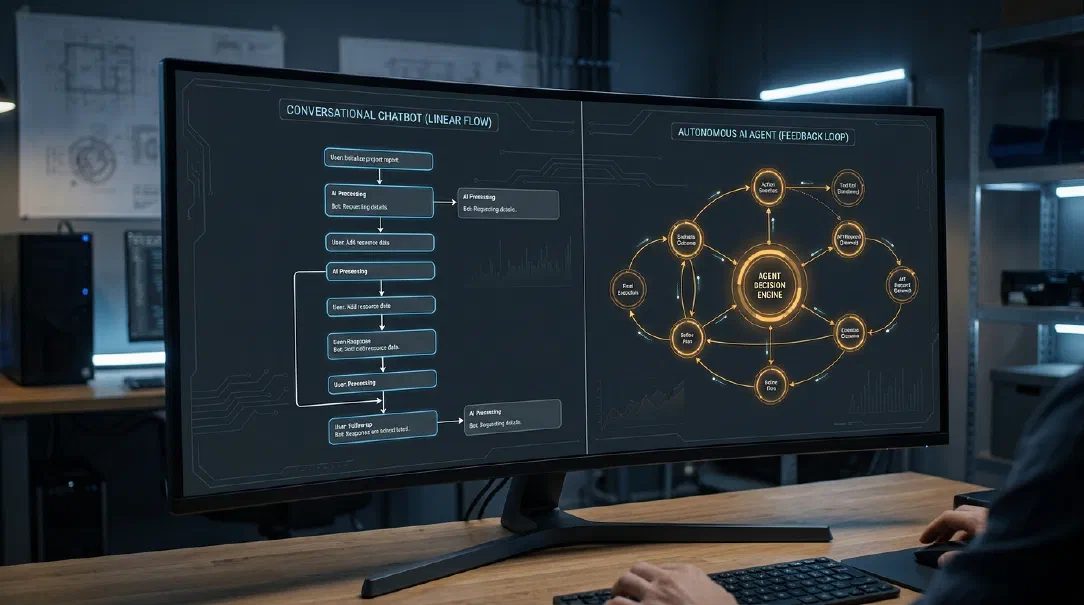
Chatbot vs. Agent: The One-Line Test for Your Architecture
In an engineering review meeting last month, two teams pitched their new “AI agent” roadmaps. Team A had built a customer support assistant with prompt-grounded retrieval; it received a ticket, fetched three policy paragraphs from a vector database, generated a polite answer, and stopped. Team B had built a reconciliation system; it read an invoice, logged into a vendor portal via API, cross-checked line items against a database, flagged discrepancies, and retried queries until the accounts balanced. (This scenario is illustrative, but variations happen across technical teams every week.)
Both teams used the word “agent.” Only one had actually built one.
The AI industry is experiencing a vocabulary collapse. Marketing teams label simple text input boxes as autonomous assistants, while developers struggle to justify why their multi-step agent architecture drains thousands of dollars in tokens without delivering reliable outcomes. If you cannot articulate the mechanical difference between a chatbot and an agent, you risk over-engineering simple features and under-architecting complex ones.
The One-Line Test
Here is the practical test to separate the two architectures:
The One-Line Test: Does the system only answer, or does it act in a loop until the job is done?
If your system receives an input, generates a response, and yields execution back to the user, it is a chatbot. If your system receives an objective, evaluates what tools it needs, executes actions, observes intermediate outcomes, and repeats that cycle autonomously until a goal is met, it is an agent.
Understanding that difference determines your infrastructure, latency profile, operational cost, and testing strategy.
How a Chatbot Works
A conversational chatbot operates on a turn-based request-response model. It is a state-preserving pipeline designed for communication rather than autonomous execution.
The Linear Execution Flow
At its core, a chatbot follows a predictable, feed-forward path:
- User input: The user submits a natural language message.
- Context assembly: The application backend retrieves recent conversation history and injects relevant domain knowledge (typically through a Retrieval-Augmented Generation pipeline).
- Inference: A foundation model processes the combined prompt and generates a single completion.
- Delivery: The backend delivers the output tokens back to the user and halts execution.
flowchart LR
    User([User]) -->|User Query| App[Application Backend]
    App -->|Vector Search| DB[(Knowledge Base)]
    DB -->|Relevant Context| App
    App -->|Prompt + Context| LLM[Foundation Model]
    LLM -->|Generated Reply| App
    App -->|Stream Response| User
Capabilities and Boundaries
Chatbots excel at synthesis, explanation, summarization, and interactive discovery. When paired with vector retrieval, a chatbot grounds its answers in verified documentation without hallucinating facts.
What a pure chatbot cannot do is make recursive decisions. It cannot realize on its own that its initial answer was incomplete, decide to run a second database query, check the results, and refine its response before showing it to the user. The user remains the control loop. If the response is missing information, the human must read it, formulate a follow-up query, and trigger the next turn.
How an Agent Works
An agent shifts the control loop from the human to the model. Instead of producing an answer for human consumption, the model produces instructions for software tools, evaluates the resulting output, and decides what to do next.
The Four Core Components
An agent is not a larger model. It is an architecture composed of four distinct pieces:
- The Brain (LLM): The reasoning core that interprets observations, formulates intermediate plans, and selects tool invocations based on an assigned objective.
- The Tools: Structured interfaces (REST APIs, database connectors, bash shells, calculators) that allow the model to interact with external state.
- The Loop: A software control harness that takes the model’s tool calls, executes them against external environments, captures the output, appends the results to context, and re-invokes the model.
- The Goal: A defined termination criteria that informs the loop when the assignment has succeeded or failed.
flowchart TD
    Goal([Assigned Goal]) --> Loop[Agent Control Loop]
    Loop --> LLM[LLM Reasoning Step]
    LLM --> Decision{Goal Satisfied?}
    Decision -->|Yes| Done([Return Final Result])
    Decision -->|No| ToolCall[Select Tool & Generate Payload]
    ToolCall --> Exec[Execute External Tool]
    Exec --> Observation[Capture Tool Output / Error]
    Observation --> Scratchpad[Append Observation to Context]
    Scratchpad --> Loop
Minimal Agent Loop Implementation
An agent does not require heavyweight third-party frameworks. The core mechanism is a bounded while-loop. Here is a minimal, vendor-neutral implementation:
def run_agent_loop(goal: str, tools: dict, max_steps: int = 5) -> str:
    """A minimal, vendor-neutral agent loop with bounded execution."""
    messages = [
        {"role": "system", "content": "You are an autonomous agent. Choose a tool or reply FINAL: with your answer."},
        {"role": "user", "content": f"Goal: {goal}"}
    ]

    for step in range(max_steps):
        # 1. Model decides whether to invoke a tool or conclude
        response = llm_client.chat(messages=messages)

        # 2. Check for explicit completion condition
        if response.startswith("FINAL:"):
            return response.replace("FINAL:", "").strip()

        # 3. Parse and validate the selected tool
        tool_name, tool_arg = parse_tool_call(response)
        if tool_name not in tools:
            messages.append({"role": "user", "content": f"Error: Tool '{tool_name}' is not recognized."})
            continue

        # 4. Safely execute external tool
        try:
            tool_result = tools[tool_name](tool_arg)
        except Exception as e:
            tool_result = f"Tool execution failed: {str(e)}"

        # 5. Append action and observation back into the context history
        messages.append({"role": "assistant", "content": response})
        messages.append({"role": "user", "content": f"Observation: {tool_result}"})

    return "Failure: Agent exceeded maximum execution step limit without achieving the goal."
In this architecture, the model drives execution. If a tool returns an error or empty data, the model reads that failure on the next iteration and attempts a different query. That autonomy is what creates power—and operational risk.
Side-by-Side Architectural Comparison
Choosing between a chatbot and an agent requires understanding their operational trade-offs across six fundamental dimensions:
| Dimension | Chatbot (Conversational) | AI Agent (Autonomous Loop) |
|---|---|---|
| Control Flow | Deterministic: exactly one inference call per user interaction turn. | Dynamic: multi-turn loop determined at runtime by the model’s choices. |
| Token & Financial Cost | Predictable: bounded strictly by input prompt length and output token limit. | Compounding: every loop iteration passes cumulative scratchpad history back to the model. |
| Response Latency | Low to moderate: tokens stream immediately (often under [INSERT REAL NUMBER] ms). | High: depends on total step count and network calls (often tens of seconds). |
| Primary Failure Modes | Hallucinations, missed retrieval context, conversational misinterpretation. | Infinite loops, invalid tool payloads, cascading errors, runaway API costs. |
| Testing Effort | Golden dataset evaluations, semantic accuracy checks, tone scoring. | Multi-step trajectory evals, state mutation verification, loop exit guarantees. |
| Best-Fit Use Cases | FAQ answering, documentation search, drafting, customer service triage. | Data migration, complex investigation, environment setup, cross-system audits. |
The Grey Area: Workflows vs. Agents
The line between chatbots and agents often blurs in real systems. Marketing literature frequently labels any application with an LLM call as “agentic,” creating confusion for engineering teams.
To make practical architectural decisions, evaluate where your system sits across a four-stage spectrum:
1. Deterministic Code with LLM Transformations
A user uploads an expense report. A Python script parses the PDF, calls an LLM once to extract vendor names into a JSON schema, validates the schema with Pydantic, and saves the data to PostgreSQL.
- Verdict: This is standard deterministic software using an LLM as a parser. There is no autonomy and no agent loop.
2. Tool-Augmented Chatbots (Single-Hop Function Calling)
A customer asks a banking chatbot for their account balance. The model identifies the intent, emits a get_balance(user_id) tool call, the backend executes the database read, and the model synthesizes the answer: “Your balance is $450.”
- Verdict: This is a tool-augmented chatbot. While it executes a tool, the control flow is hardcoded: User -> Model -> Single Tool -> Model -> User. The model cannot choose to take three more actions before replying.
3. Fixed Workflows (Chains and DAGs)
A system runs a fixed sequence: Step 1 classifies an incoming customer email; Step 2 pulls relevant account history; Step 3 drafts a response; Step 4 checks tone with an LLM judge.
- Verdict: This is a deterministic workflow with LLM nodes. The path is hardcoded in software; the LLM merely executes assigned tasks within rigid guardrails.
4. True Autonomous Agents
You instruct a system: “Find all customer accounts with billing discrepancies between Stripe and our database, identify the root cause for each, and prepare a staging reconciliation batch.”
- Verdict: This is an agent. The system must decide how many accounts to check, which API endpoints to query, how to handle unexpected error payloads, and when the audit is complete.
When You Do Not Need an Agent
Engineers often jump to autonomous agents because the concept sounds powerful. In production, autonomy is a liability unless the problem explicitly requires it. Every degree of autonomy you grant a model increases testing difficulty and operational cost.
Here are four common scenarios where an agent is the wrong choice:
1. Single-Step Information Tasks
If your problem involves answering a question, summarizing text, classifying an email, or transforming a payload, you do not need an agent loop.
- What to use instead: A direct, single-turn LLM API call with structured outputs and prompt caching.
2. Predictable, Fixed Business Processes
If the sequence of steps can be drawn on a whiteboard as a flowchart—even a complex one with branching logic—an autonomous model should not decide what to do next. If Step B always follows Step A, hardcode the transition in Python.
- What to use instead: A deterministic workflow engine (such as Celery, Temporal, or a lightweight state machine) where LLMs handle specific unstructured reasoning tasks inside fixed boundaries. To explore this pattern, read my guide on why you should start with a workflow not an agent.
3. Costly or Irreversible State Changes
Granting an autonomous agent permission to delete database rows, initiate bank refunds, or send outbound emails to customers invites disaster. Models struggle with boundary edge cases.
- What to use instead: A deterministic backend service where the LLM drafts actions for explicit human approval before any database write executes.
4. Strict Latency or Budget Constraints
If your user interface requires sub-second response times—such as interactive voice agents or live support chat—an agent loop is fundamentally unsuitable. A three-step agent loop running against a frontier model can easily accumulate fifteen seconds of latency and thousands of tokens per request.
- What to use instead: A streaming conversational chatbot paired with exact-match Redis caching and model tiering.
When an Agent Is the Right Choice
An autonomous agent becomes necessary only when the exact sequence of actions cannot be predicted in advance, and the system must dynamically explore an environment to achieve its goal.
Good use cases include:
- Investigative troubleshooting: Diagnosing why a server cluster is reporting degraded performance by iteratively checking logs, running diagnostic commands, reading outputs, and narrowing down the issue.
- Deep research synthesis: Searching across internal knowledge bases, discovering that a critical document references an outside standard, fetching that standard, cross-referencing both sources, and compiling a gap analysis.
- Code migration and refactoring: Scanning a repository for deprecated API endpoints, rewriting matching functions, running test suites, parsing compilation errors, and repeating until tests pass.
Non-Negotiable Agent Guardrails
If you determine that your use case requires an agent, you must build strict operational boundaries around the loop:
- Hard Step Limits: Every loop must enforce a maximum iteration count (such as [INSERT REAL NUMBER] steps) to prevent infinite loops from draining API balances.
- Strict Tool Scoping: Apply the principle of least privilege. Give the agent read-only tools by default. Never expose raw SQL execution or un-sandboxed shell environments. Remember that tool design is the real agent skill that prevents execution failures.
- Human-in-the-Loop Approval: Require a human signature before executing state-altering tools (such as sending a payment, modifying production configurations, or deleting files).
- Comprehensive Execution Tracing: Log every intermediate step, tool argument, returned observation, and token count. When an agent fails, you need complete trajectory replay to diagnose why. To understand the common failure traps, see my analysis of 5 ways AI agents fail in production.
The Decision Checklist
Before writing agent scaffolding, walk your team through these seven questions:
- Can the user’s intent be resolved in a single prompt-and-response turn?
If yes, build a chatbot. - Is the sequence of execution steps known before the user submits their request?
If yes, build a deterministic workflow. - Does the task require immediate, low-latency streaming responses (under 2 seconds)?
If yes, build a chatbot. - Are the actions taken by the system irreversible or high-risk?
If yes, build a workflow with human authorization gates. - Does the task require dynamically choosing between multiple tools based on unpredictable intermediate outputs?
If yes, you may need an agent. - Can the environment provide clear, structured feedback that an LLM can evaluate?
If yes, an agent loop has the feedback signal needed to succeed. - Do you have automated evaluation suites to test multi-step execution trajectories?
If no, do not ship an agent to production yet.
From My Own Work
[INSERT MY REAL EXAMPLE HERE]
Conclusion
The difference between a chatbot and an agent is not intelligence, model size, or marketing vocabulary. It is control architecture.
A chatbot communicates; an agent acts. A chatbot relies on a human in the loop to drive multi-turn reasoning; an agent internalizes that loop in software to pursue an objective autonomously.
When building AI systems, start with the simplest architecture that solves the problem. Build a prompt first. If that proves insufficient, add retrieval. If you need multi-step processing, write a deterministic workflow with explicit code. Add autonomous agent loops only when the task cannot be solved any other way.
What are you building: a chatbot or an agent?
If you are trying to decide which architecture fits your product or wrestling with agent failure modes in staging, I would enjoy hearing about it. Leave a comment below or send me an email to talk through your system design.
Written by Muhammad Faizan Nadeem
Email: imfaizannadeem2@gmail.com
Website: https://faaizan.space